






.svg)






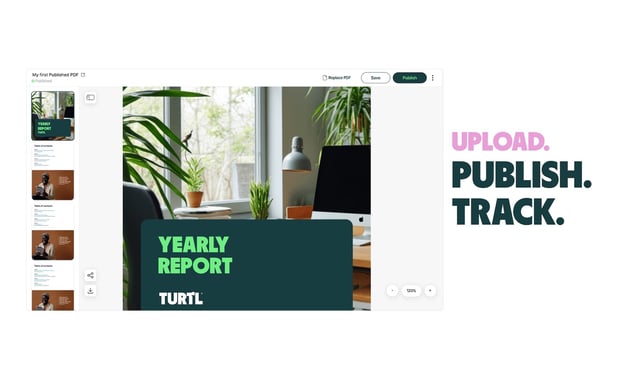
Marketing and sales teams know the reality: PDFs are everywhere. From product one-pagers and datasheets to case studies and analyst reports, these files form the backbone of go-to-market content libraries. They're quick to share, familiar to audiences, and preserve your carefully crafted branding.
But they've always come with a catch - once a PDF leaves your hands, the trail goes cold. Did anyone open it? Which sections resonated? Did it influence a deal? These questions have gone unanswered for too long.
Today, we're changing that.
Welcome your PDFs to the Revenue Era
Turtl’s PDF Publishing feature allows for your existing PDF content into the Turtl Revenue Content Platform. Upload any PDF in seconds, generate a trackable link, and suddenly your static assets become insight-driven tools connected to your revenue ecosystem.
Your content looks exactly as you designed it, your audience gets the familiar PDF experience they expect, and you finally get the visibility you need to prove content impact.
How it works
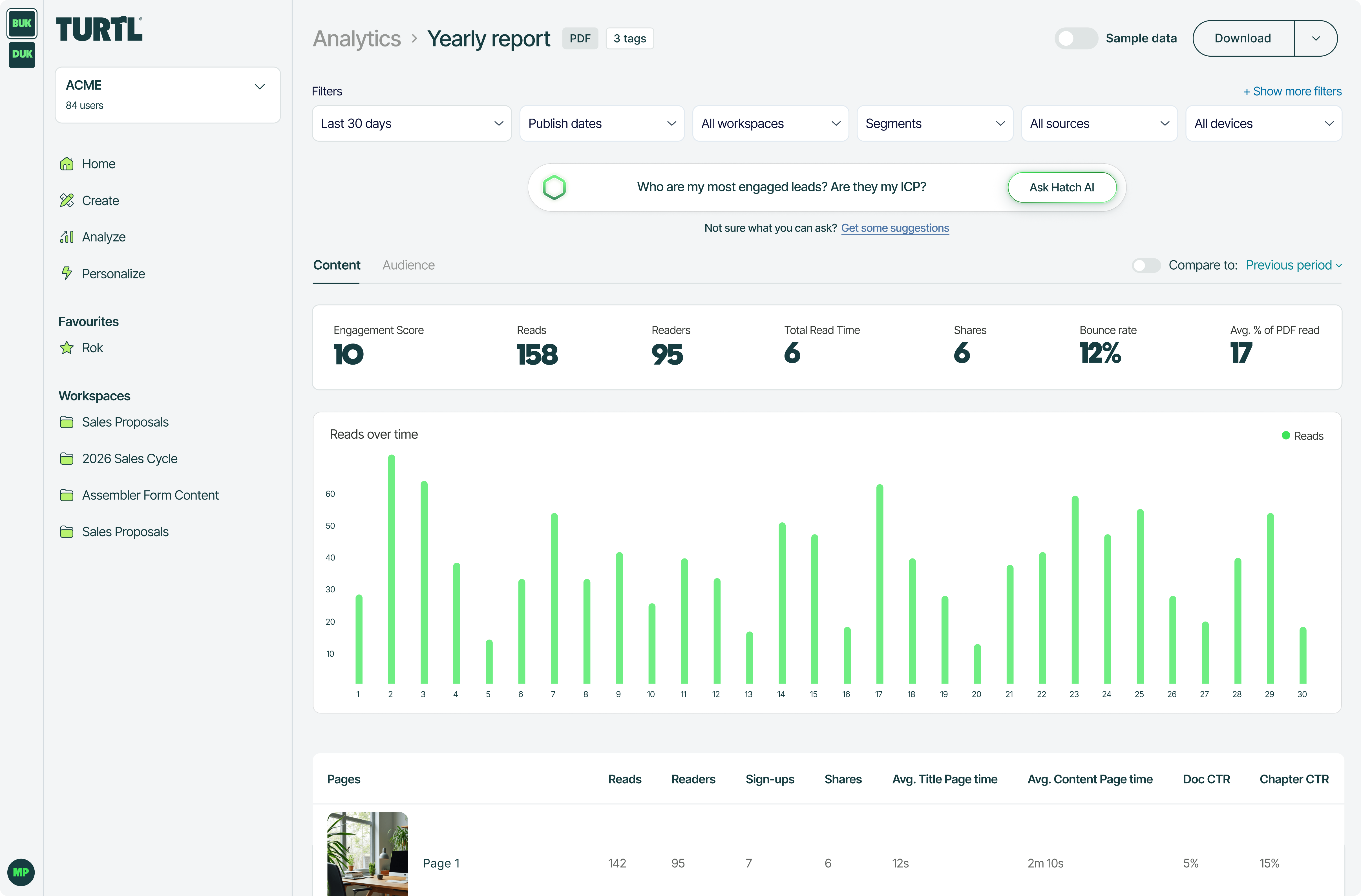
When you publish a PDF in Turtl, you gain access to the same powerful analytics that make Turtl Docs so valuable:
- Performance metrics that matter: Track page views, read time, and link clicks. See where readers engage and where they drop off. Understand bounce rates and content consumption patterns.
- Audience intelligence: Identify known contacts when using appropriate integrations, and build a complete picture of how your audience interacts with your marketing assets.
- Revenue attribution: Because your PDF lives in Turtl, it feeds into the same CRM integrations and revenue dashboards as your Turtl Docs. This allows you to prove pipeline influence, connect content to closed revenue, and show ROI with confidence.
- Seamless updates: Fix a typo or update a stat without changing the URL. Your links stay consistent while your content stays current.
Built for real workflows
We built Turtl’s PDF Publishing around how teams actually work:
Upload your finished PDF with a simple drag and drop. Choose between scroll or slide navigation to match your preference. Share the trackable link across email campaigns, on landing pages, or through sales outreach. Now grab a cup of tea, and watch the engagement data flow in!
Who benefits most
- Marketing managers running campaigns can finally measure PDF performance alongside other content formats.
- ABM teams can track account engagement with targeted materials.
- Sales enablement leaders can see which assets actually get used and how prospects respond.
- Partner marketing teams can share co-branded content while maintaining visibility into its impact.
If you've ever sent a PDF and wondered what happened next, PDF Publishing within Turtl gives you the answer.
Getting started
If you’re thinking we’d make you pay more for this - you’re wrong. PDF Publishing is now available on all AI plans (Adopt AI, Grow AI, and Scale AI). Ready to bring your PDF library into the revenue era? Log into your Turtl account and start uploading.
Your content deserves to be seen, measured, and connected to the outcomes it drives. Now it can be.
Frequently Asked questions
What is PDF Publishing in Turtl?
PDF Publishing allows you to upload existing PDF files to Turtl and generate trackable links that provide detailed analytics on how your audience engages with the content. You get performance metrics like page views, read time, and link clicks without redesigning your PDF.
Can I edit my PDF after uploading it to Turtl?
You can replace the PDF file to fix typos or update information, and the URL will remain the same. However, you cannot edit the text or images directly within Turtl.
What analytics do I get with Turtl’s PDF Publishing?
You'll see page views, read time, link clicks, bounce rates, and known reader identification when using appropriate integrations. The PDF feeds into the same CRM integrations and revenue dashboards as Turtl Docs, enabling revenue attribution.
Do I need to recreate my PDFs in a new format?
No. Upload your existing PDF exactly as it is. Your branding, layout, and design remain intact while you gain visibility into engagement and performance.
Can I gate my PDF with a lead capture form?
Lead capture forms are not available in the first version of PDF Publishing, though we're considering adding this capability soon. Known contacts can still be identified through existing integrations.
How much does PDF Publishing cost?
Static PDF Hosting is included in all AI plans: Adopt AI, Grow AI, and Scale AI. If you're on an older plan, you'll need to migrate to an AI plan to access this feature.
Can viewers download the PDF?
Yes. Viewers have the option to download the original PDF file.
What's the difference between scroll and slide navigation?
When uploading your PDF, you can choose how viewers navigate through it. Scroll mode presents the PDF as a vertical scrolling document, while slide mode displays it as horizontal pages. Pick whichever suits your content and audience preference.