









.jpg?width=1976&height=1480&name=Turtl%20x%20OneAdvanced%20(1).jpg)





HOW TO CONNECT CONTENT ENGAGEMENT DATA TO SALESFORCE OPPORTUNITIES
Apr 20, 2026
Contents
- What "content engagement data integration" actually means for Salesforce
- How the Salesforce integration works
- What shows up in Salesforce
- What you need before the integration produces meaningful data
- Connecting marketing automation alongside Salesforce
- Frequently asked questions
Head of Product Marketing and AI GTM @ Turtl, Award-Winning PMM and globally recognized PMM leader. Author of the best-selling book "The Product Momentum Gap.”
See Turtl for yourself
Connecting content engagement data to Salesforce opportunities requires three things working together: a content platform that captures behavioral data at the contact level, a CRM integration that routes that data as custom events on deal records, and a matching mechanism that links known readers to the contacts already in your Salesforce. When all three are in place, your Salesforce pipeline shows not just which deals are open but which content those accounts engaged with before and during the sales process.
This guide explains how that connection works in Turtl's Revenue Analytics, what data flows into Salesforce and how, and what you need to have in place before the integration starts producing meaningful attribution.
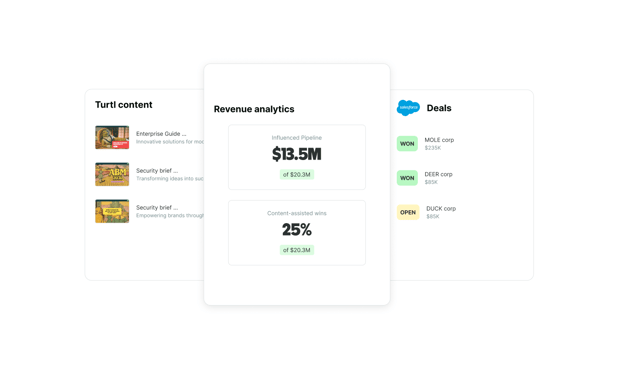
TL;DR: Turtl connects content engagement to Salesforce opportunities by matching known readers to CRM contact records, then mapping those contacts to their associated deals. The result is an attribution dashboard showing which campaigns and assets are influencing open pipeline and closed revenue, without custom BI work. All you need Salesforce connected via Turtl's integration settings.
What "content engagement data integration" actually means for Salesforce
Most CRM integrations for content platforms record that a contact visited a page. That is not engagement data, it's a visit log. Meaningful content engagement data captures what someone actually did inside the content: which sections they spent time on, whether they returned, whether multiple contacts from the same account engaged with the same asset, and how those behaviors progressed over time.
When that data is connected to Salesforce opportunities, each open deal gains a content engagement history. Sales reps can see which assets their prospects engaged with before the opportunity was created. Marketing can see which campaigns are generating the most pipeline influence. RevOps can build attribution reports that connect specific content to specific closed deals.
The gap most B2B teams have is not data collection. Turtl captures section-level engagement on every asset. The gap is the routing layer that gets that data into Salesforce in a form that updates contact records, deal timelines, and attribution dashboards automatically.
How the Salesforce integration works
Step 1: Connect Salesforce via the revenue configurator
Turtl's Salesforce integration is self-serve. In your Turtl account, go to integration settings and open the revenue configurator. Authenticate your Salesforce instance and grant the required permissions. Once connected, Turtl begins processing your deal data. The Revenue Analytics dashboard switches from sample data to real pipeline figures automatically once that processing is complete.
If you use Pardot or Marketo alongside Salesforce for contact tracking, connect those integrations as well. Turtl matches known reader data from your MAP to deal records in Salesforce automatically, as long as both integrations are active.
Step 2: Identify known readers in your content
The attribution model depends on known contacts, that is, buyers whose identity Turtl has confirmed and can match to a record in your CRM. Unknown contacts generate engagement data but cannot be attributed to Salesforce deals without a contact match.
Turtl identifies known contacts through three mechanisms: personalized LCURLs (unique links generated for a specific contact), form submissions embedded in Turtl content, and intent signal matching when a reader's behavior matches a known contact's email or browser fingerprint. The more known contacts your content generates, the richer the attribution.
To improve known contacts rates, distribute content through personalized LCURLs rather than generic links wherever possible, embed lead capture where it fits the content experience, and ensure your Turtl and Salesforce contact records are kept in sync.
Step 3: Turtl matches buyers to contacts and contacts to deals
When a known contact engages with Turtl content, Turtl matches that buyer to their corresponding contact record in Salesforce. It then maps that contact to any associated opportunities in your pipeline. A reader who is a contact on three open deals contributes engagement data to all three.
This matching runs automatically and updates the Revenue Analytics dashboard in near real time. You do not need to configure field mapping manually or run periodic syncs.
Step 4: Review attribution in the Revenue Analytics dashboard
The dashboard shows attribution at three levels: campaign, project, and individual asset. For each level, you can see which deals were influenced, which contacts engaged with the content, the total pipeline value associated with those deals, and how engagement maps to deal stage progression.
Hatch, Turtl's AI Revenue Agent, sits on top of the attribution data and surfaces prioritized recommendations. Rather than interpreting charts manually, your team receives a clear view of the biggest revenue opportunities in your account base and the specific content actions most likely to move them forward.
What shows up in Salesforce
Once the integration is active, content engagement data appears on Salesforce contact and deal records as custom activity events. Reps can see which assets a contact has engaged with directly from the contact timeline, without leaving Salesforce. At the deal level, the opportunity record shows the full content engagement history of all associated contacts.
This makes content engagement data actionable in the sales workflow. A rep preparing for a call can see that the VP of Finance spent 12 minutes on the ROI section of a Turtl Doc two days ago and then shared it with a colleague. That context changes the conversation.
For marketing ops, the custom event data feeds into Salesforce reporting, so attribution dashboards and pipeline influence reports can be built natively inside Salesforce without a separate analytics tool.
What you need before the integration produces meaningful data
A connected Salesforce integration. The Revenue Analytics dashboard requires an active Salesforce or HubSpot connection configured through Turtl's integration settings. Sample data is visible to all users before connection; real deal data requires authentication.
Tagged content. Content types are automatically tagged, but adding topics to individual assets and chapters manually makes Hatch's recommendations significantly more specific. The more granular your content tagging, the more precise the attribution at the campaign and topic level.
Appropriate user permissions. Real deal data in the Revenue Analytics dashboard is visible to Global Admins, Admins, and Integration Managers. All users can view sample data. If team members are not seeing live attribution, check their permission level in Turtl's user settings.
Connecting marketing automation alongside Salesforce
Many B2B teams run Salesforce for deal management and Pardot or Marketo for contact tracking and nurture. Turtl's integration handles this stack natively. Connect your MAP integration in Turtl settings alongside Salesforce, and Turtl matches known reader data from your MAP (contacts identified through email clicks, form submissions, or tracking cookies) to deal records in Salesforce automatically.
This means a contact identified through a Marketo form submission who later engages with Turtl content will be attributed to their Salesforce opportunity without manual data reconciliation. The two integrations work together rather than requiring a separate data mapping exercise.
Frequently asked questions
How do I connect content engagement data to Salesforce opportunities?
Connect your Salesforce account through the revenue configurator in Turtl's integration settings. Once authenticated, Turtl matches known contacts — buyers identified through personalized LCURLs, form submissions, or intent signal matching — to their corresponding Salesforce contact records. It then maps those contacts to associated opportunities, and the Revenue Analytics dashboard shows which content assets influenced which deals.
What content engagement data flows into Salesforce?
Turtl sends contact-level behavioral events into Salesforce as custom activity records. These include which assets a contact engaged with, the depth of engagement by section, return visits to the same asset, and whether multiple contacts from the same account engaged with the same content. This data appears on contact timelines and deal records, and can be used in Salesforce reporting for pipeline attribution.
How does Turtl match content engagement to Salesforce deals?
Turtl identifies known contacts through personalized LCURLs (unique per-contact links), form submissions embedded in content, and intent signal matching. When a known contact engages with content, Turtl matches their identity to a contact record in Salesforce and traces that contact to any associated open opportunities. The match runs automatically and does not require manual field mapping.
Does content engagement data integration with Salesforce require developer support?
No. Turtl's Salesforce integration is fully self-serve through the revenue configurator in your Turtl integration settings. No developer involvement, custom field mapping, or IT project is required. Once you authenticate your Salesforce instance, deal data processes automatically and the Revenue Analytics dashboard updates from sample data to real pipeline figures without any additional configuration.
Can I use Turtl's Salesforce integration alongside Pardot or Marketo?
Yes. If you use Pardot or Marketo alongside Salesforce, connect both integrations in Turtl's settings. Turtl matches known reader data from your MAP to deal records in Salesforce automatically, so contacts identified through Marketo form submissions or Pardot tracking are attributed to their Salesforce opportunities without manual data reconciliation.
What is a known contact and why does it matter for Salesforce attribution?
A known contact is a buyer whose identity Turtl has confirmed and can match to a record in your CRM. Known contacts are the foundation of content-to-deal attribution: without a contact match, engagement data cannot be linked to a Salesforce opportunity. You can increase known contact rates by distributing content through personalized LCURLs, embedding lead capture in Turtl content, and keeping your Turtl and Salesforce contact records in sync.
Which plans include Revenue Analytics with Salesforce?
Revenue Analytics is included at no additional cost for customers on Grow AI and Scale AI packages. Customers on older packages that include CRM integrations are also eligible. Contact your CSM to confirm eligibility if you are on a legacy plan.
Turtl connects content engagement to Salesforce pipeline automatically. See which assets are influencing your deals.